Elevate Your Virtual Stage: The Remote Conference Template
In the current landscape of digital communication, a presentation is rarely just a set of slides; it is a performance. Whether you are hosting a global summit from your living room or addressing a boardroom via Zoom, the visual backdrop of your talk dictates how your message is received. This is where the Remote Conference Template steps in. It is not merely a collection of placeholders for text; it is a meticulously designed framework intended to bridge the gap between physical presence and digital engagement. As a creative professional, I have seen too many speakers rely on static, uninspired layouts that cause their audiences to mentally check out. This template, conversely, brings a "playful and dynamic" energy that is essential for keeping remote attendees hooked.
The philosophy behind this design asset is one of efficiency and impact. We often fall into the trap of thinking that more is better—that 600 slides equal a comprehensive presentation. In reality, density kills attention spans. This template champions the idea that you only need the right slides to make your presentation pop. It is designed for the modern speaker who values clarity over clutter, offering a visual language that supports your narrative rather than competing with it. The aesthetic is contemporary, utilizing clean lines and bold compositions that feel professional yet approachable, striking a balance that is crucial for both corporate keynotes and creative workshops.
The Anatomy of a Dynamic Visual System
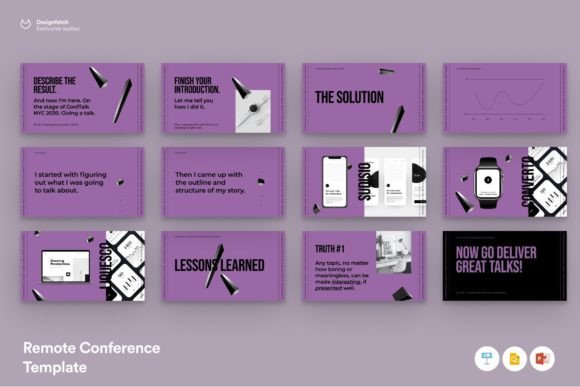
When we talk about the "personality" of a template, we are looking at how it shapes the viewer's emotional response. The Remote Conference Template possesses a distinct character defined by its structural versatility. It moves away from the rigid, monotonous grids of traditional corporate slides. Instead, it employs asymmetric layouts and strategic white space to create a sense of movement. This visual rhythm is vital for web design and digital presentations because it mimics the fluidity of scrolling through high-quality social media graphics. It feels native to the screen, rather than feeling like a digitized piece of paper.
One of the most critical aspects of any premium font or template system is its adaptability. This template provides over 60 unique slides, but the true value lies in its modularity. The color palette is not hard-coded; it is easily editable, allowing you to inject your brand identity seamlessly. If your brand relies on a specific sans serif font for headings to convey modernity, or a serif font for body text to imply authority, the architecture of these slides supports it without breaking the layout. The design respects the principles of visual hierarchy, ensuring that your key takeaways are never lost in the noise.
Strategic Applications Beyond the Keynote
While the name suggests a focus on remote conferences, the utility of this design system extends far beyond a single Zoom call. For entrepreneurs and small business owners, this template serves as a foundational tool for brand consistency. Imagine using the same visual framework for your investor pitch deck, your quarterly internal review, and your client-facing workshop. This repetition builds brand recognition. When you use a consistent typeface system—perhaps pairing a geometric sans serif with a humanist script font found within the documentation—you create a cohesive ecosystem that looks expensive and intentional.
For marketers and content creators, the applications are equally robust. Consider the needs of editorial design in a digital context. You can repurpose the slides into high-value lead magnets or downloadable PDF guides. The "drag and drop" functionality for images means you can quickly swap out stock photos for original product photography, making the template ideal for packaging design presentations or social media strategy decks. It acts as a bridge between your raw ideas and a polished deliverable, saving you the hours typically spent aligning boxes and text fields in software.
Maximizing Readability and Audience Engagement
A beautiful slide is useless if the audience cannot read it from the back of the room—or on a mobile screen. This is where the practical engineering of the Remote Conference Template shines. The layout grid is optimized for readability. Text blocks are sized to ensure legibility without requiring the presenter to zoom in, a common pitfall in DIY designs. When selecting your typography, this template encourages the use of modern typography principles. It suggests using display fonts for headers to grab attention and cleaner, highly legible styles for body text to facilitate information retention.
I often advise clients to treat their presentation software (whether Powerpoint, Keynote, or Google Slides) as a design environment equal to Illustrator or InDesign. This template facilitates that mindset. It includes editable shapes and styles, allowing you to create infographics or data visualizations that tell a story. Instead of a static bar chart, you can utilize the dynamic shapes provided to create visual metaphors that resonate. This level of customization ensures that your slides are not just "read" but "felt," significantly boosting audience engagement.
Practical Implementation and Workflow
Adopting a new design asset into your workflow should streamline your process, not complicate it. The Remote Conference Template is built for speed. The "easy drag and drop" feature is particularly relevant for hobbyists or crafters who may not be tech-savvy but want to present their projects with professionalism. However, for the advanced user, the ability to edit colors, styles, and shapes means you are not locked into a rigid structure. You have the freedom to experiment with font pairing, perhaps testing how a bold handwritten font contrasts with a rigid technical sans serif to highlight a specific creative tension in your talk.
When you download this template, pay close attention to the "Documentation" file. It is not just a technical manual; it is a style guide. It details the free fonts used, which helps you maintain the intended aesthetic if you choose to stick with the original design. It also clarifies the licensing, which is crucial for commercial use. Whether you are a freelance designer building a deck for a client or a blogger creating a media kit, understanding the scope of your assets ensures you stay professional and legally sound. Ultimately, this template is more than a set of slides; it is a toolkit for anyone serious about communicating their ideas with clarity, style, and confidence.